

Your iPhone photos. Only the ones you want.
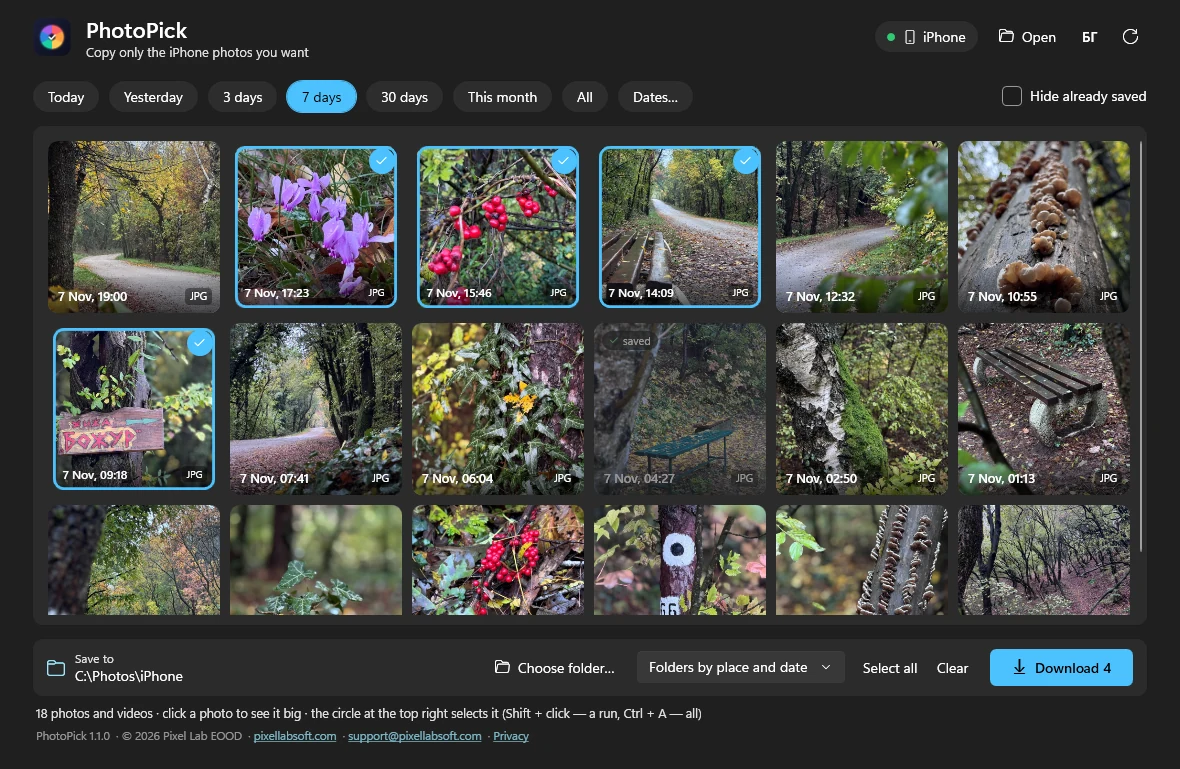
PhotoPick is a small free program for Windows. Plug in your iPhone with a cable, pick a period — today, the last 3 or 7 days, this month or exact dates — and you see only the photos and videos from it, with previews. Click the ones you want and press “Download”.
It does not wait for every photo on the phone to load, like the import built into Windows — it opens only the period you picked. Click a photo and it opens big; the arrow keys take you to the next one, and ⟲ ⟳ rotate it — the turn is saved into the downloaded file. Photos come out upright, selfies included.
It sorts what you save the way you want: into one folder, into folders by month, or into folders by place and date — for example “Paris 07.11.2026”. The place comes from the photo itself and a list of towns built into the program, with no internet. It remembers which photos are already saved — they stay in the grid, a little darker — and never copies the same file twice. Shift + click selects a whole run.
No account and no ads. It sends nothing to the internet and deletes nothing from the phone. In English and Bulgarian. Tested on Windows 11 (64-bit). If Windows does not see the iPhone, install Apple Devices from the Microsoft Store, unlock the phone and tap “Trust”. Place names come from GeoNames (CC BY 4.0).